Lifetime license
No subscription
1 user In stock
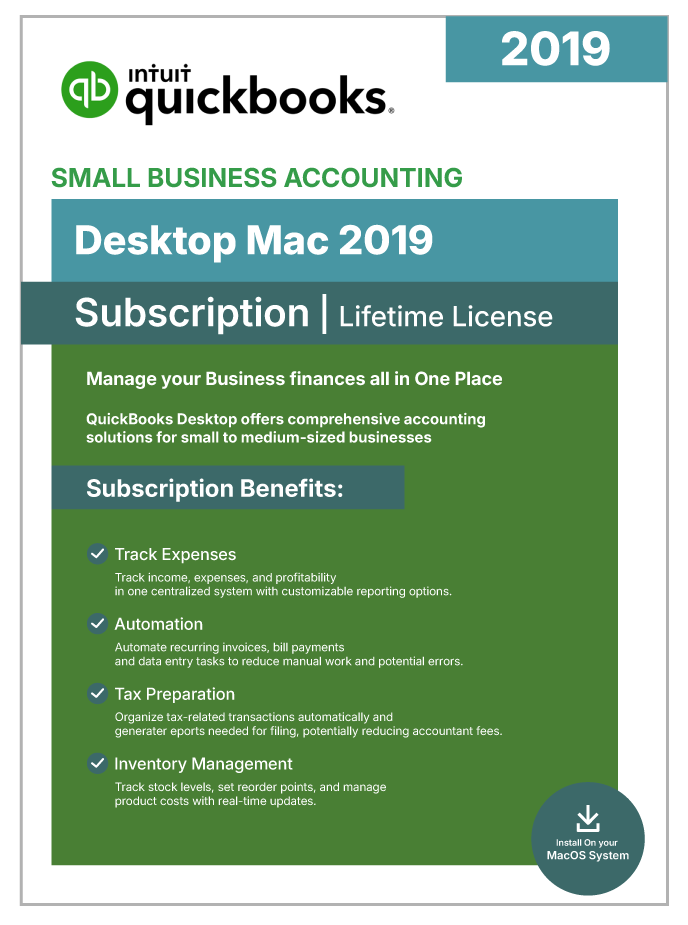
QuickBooks Desktop Mac 2019 | Lifetime License | No Subscription | 1-User |
$129.99
USD - one-time payment
Genuine License Key: Legacy QuickBooks Desktop releases (Pro 2021 and earlier editions) were distributed as one-time perpetual purchases, commonly marketed as “lifetime” licenses.
Official Software Access: Delivers full entitlement to the genuine QuickBooks Desktop build, including every official patch and security update.
Data Security: Keeps your books on your own machine with scheduled automatic backups, so financial data stays under your control.
Digital Delivery: Fully digital fulfillment — the download link and license credentials arrive by secure email shortly after purchase.
Emailed after verificationUsually within a few business hours
Free installation supportUntil the software activates
Product overview
Product Overview
QuickBooks Desktop Mac 2019 is a native macOS accounting application offered as a one-time perpetual-license purchase, making it one of the most affordable ways to own professional QuickBooks Desktop software for the Mac without any ongoing subscription cost. Unlike the newer Mac Plus subscription releases, the 2019 version never requires an annual renewal — activate once and the software is yours.
As a legacy release, Mac 2019 delivers a stable, thoroughly tested accounting platform for small businesses that want core financial management tools without the complexity of subscription-based cloud features. The software covers the essentials — professional invoicing with brand-styled templates, expense categorization, accounts payable and receivable, entry-level inventory tracking, multi-currency transactions, and comprehensive financial reporting.
The Mac 2019 interface follows Apple design conventions closely, offering a familiar experience for Mac users. Integration with Mac Mail lets you email invoices and reports directly from the application, Apple Contacts syncs customer information, and AirPrint enables wireless printing. The software runs on Intel Macs natively and works on Apple Silicon (M1, M2) through Rosetta 2 emulation.
For freelancers, solopreneurs, and small Mac-first businesses that need proven accounting fundamentals without any ongoing fees — and who don’t require the latest cloud-connected features — Mac 2019 delivers the QuickBooks Desktop experience in a purpose-built Apple package.
Included capabilities
Product Features
- Perpetual License, No Subscription — One-time purchase gives you permanent ownership — no monthly or annual charges, and you can use the software indefinitely.
- Native macOS Application — Built specifically for the Mac, following Apple design conventions rather than running a Windows version through emulation.
- Double-Entry Accounting Suite — Handles General Ledger, A/P, A/R, sales tax, and bank reconciliations inside a single integrated Mac application.
- Professional Invoicing with Templates — Design branded invoices and estimates, follow outstanding balances, and email them directly through Mac Mail.
- Multi-Currency Support — Record transactions in multiple currencies with automatic exchange-rate handling for international vendors and customers.
- Entry-Level Inventory Tracking — Watch stock levels, set reorder points, and compute Cost of Goods Sold for product-based small businesses.
- Mac Mail and Apple Contacts Integration — Email invoices and reports directly through Mac Mail and pull customer information from your existing Apple Contacts.
- AirPrint Wireless Printing — Print invoices, checks, and reports wirelessly to any AirPrint-compatible printer on your network.
- Three Simultaneous Users — Share your company file with up to three team members over a local network with role-based permissions.
- Fully Local Data Storage — All financial data stays on your Mac — full control and full offline capability after activation.
Technical details
Minimum Requirements / Specifications
| Requirement | Minimum | Recommended |
| Operating System | macOS 10.14 (Mojave) | macOS 10.15 (Catalina) |
| Processor | Intel Core 2 Duo | Intel Core i5 or higher |
| RAM | 2 GB | 4 GB |
| Disk Space | 250 MB available | 500 MB+ available |
| Internet | Required for installation and initial activation | Broadband |
| Display | 1280 x 800 resolution | 1440 x 900 or higher |
| Apple Silicon (M1/M2) | Compatible via macOS Rosetta 2 | Rosetta 2 enabled |
| Printer | 100% Macintosh-compatible printer | — |
| Export Compatibility | Apple Numbers v3.5 or Microsoft Excel 2016+ | — |
| License Type | Perpetual (one-time purchase, lifetime access) | — |
| Max Simultaneous Users | 3 | — |
Common questions
Frequently Asked Questions
Q: What is QuickBooks Desktop Mac 2019?
A: Mac 2019 is Intuit’s native macOS accounting application, sold as a one-time perpetual-license purchase. It covers double-entry bookkeeping, professional invoicing, expense categorization, bank reconciliation, entry-level inventory tracking, multi-currency support, and financial reporting — including Profit & Loss, Balance Sheet, and Cash Flow. After activation you own the software permanently with no recurring fees.
Q: Does QuickBooks Mac 2019 require a subscription?
A: No. Mac 2019 is a perpetual-license product with no monthly or annual subscription fees. Once activated, the software is yours to run indefinitely. This edition predates Intuit’s move to the Mac Plus subscription-only model.
Q: Will QuickBooks Mac 2019 run on Apple Silicon (M1, M2, M3)?
A: Yes, with a caveat. Mac 2019 was built for Intel-based Macs but runs on Apple Silicon through Rosetta 2 emulation. Performance is generally acceptable for small-business use, though native-Silicon editions like Mac Plus 2024 will be noticeably faster on M1/M2/M3 machines. Mac 2019 is not code-signed to run natively on Apple Silicon.
Q: What are the system requirements for QuickBooks Mac 2019?
A: Mac 2019 needs macOS Mojave (10.14) or Catalina (10.15) at a minimum, 2 GB of RAM, and 250 MB of free disk space. An Intel processor is preferred (Apple Silicon works via Rosetta 2). An internet connection is required for installation and initial activation.
Q: How many users can QuickBooks Mac 2019 support?
A: Mac 2019 allows up to three concurrent users on a local network, with each user beyond the first requiring an additional license seat. There is no Premier or Enterprise upgrade path for the Mac product line — Mac users needing more concurrent access have historically moved to the Windows product line.
Q: Are connected services still available for Mac 2019?
A: No. Mac 2019 has reached end-of-life status with Intuit. Live bank feeds, payroll integration, payment processing, and security patches have all been permanently discontinued. The offline accounting engine continues to function for invoicing, expense tracking, manual reconciliation, reporting, and inventory management.
Q: Can I import my QuickBooks Windows data into Mac 2019?
A: Yes, with limitations. QuickBooks Mac 2019 can import company files converted from QuickBooks Windows using Intuit’s conversion utility, but not all data transfers cleanly. Custom templates, some report formats, and advanced features may need to be rebuilt in Mac 2019. Reviewing the imported file for accuracy is recommended before relying on it.
Q: What macOS versions does Mac 2019 support?
A: Mac 2019 is officially supported on macOS Mojave (10.14) and Catalina (10.15). It has not been updated to run on Big Sur or later versions of macOS natively, though it may run through Rosetta 2 on Apple Silicon devices running newer macOS releases. Reliability on unsupported macOS versions is not guaranteed.
Customer feedback
Reviews
You may also like
View category Related Products
Reviews
There are no reviews yet.