Lifetime license
No subscription
1 user In stock
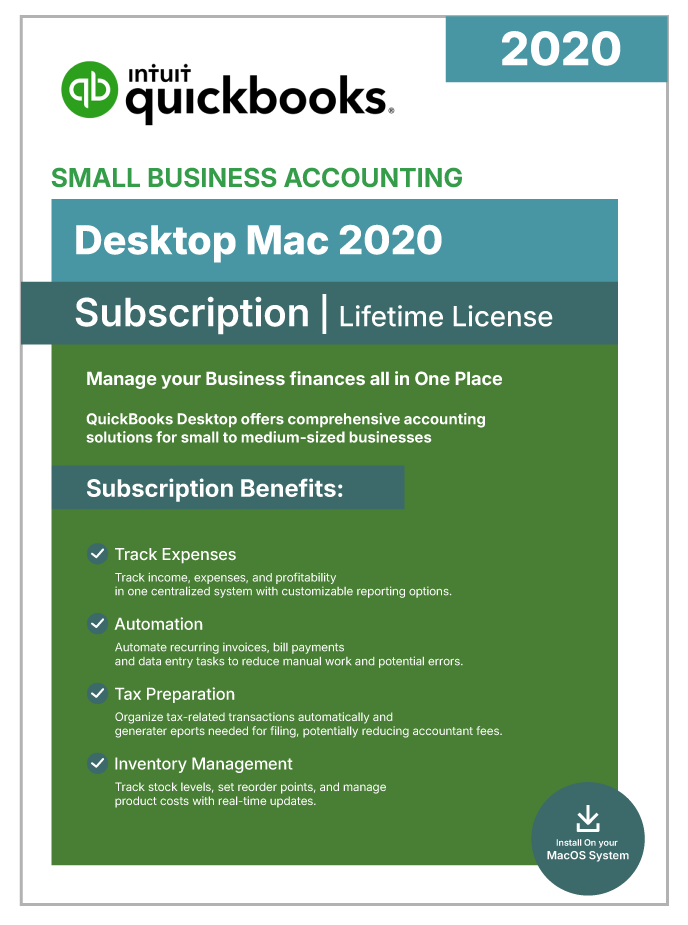
QuickBooks Desktop Mac 2020 | Lifetime License | No Subscription | 1-User |
$149.99
USD - one-time payment
Genuine License Key: Legacy QuickBooks Desktop releases (Pro 2021 and earlier editions) were distributed as one-time perpetual purchases, commonly marketed as “lifetime” licenses.
Official Software Access: Delivers full entitlement to the genuine QuickBooks Desktop build, including every official patch and security update.
Data Security: Keeps your books on your own machine with scheduled automatic backups, so financial data stays under your control.
Digital Delivery: Fully digital fulfillment — the download link and license credentials arrive by secure email shortly after purchase.
Emailed after verificationUsually within a few business hours
Free installation supportUntil the software activates
Product overview
Product Overview
QuickBooks for Mac has been the go-to desktop accounting choice for Apple users for years, and the 2020 edition remains a practical pick for anyone who wants a QuickBooks desktop version without ongoing subscription obligations. As a one-time purchase with a perpetual license, Mac 2020 removes the recurring fees that come with the newer subscription-based Mac Plus editions.
This native macOS application delivers a complete set of double-entry bookkeeping tools — from creating professional invoices and tracking expenses to reconciling bank accounts and running detailed financial reports like Profit & Loss, Balance Sheet, and Cash Flow. Entry-level inventory tracking, multi-currency transactions, and job costing are also included, making it well suited to service businesses, product retailers, and freelancers alike.
Mac-specific integrations include Time Machine for local backups, AirPrint for wireless printing, and Apple Calendar for scheduling reminders. The software runs natively on Intel-based Macs and works on Apple Silicon (M1, M2) through Rosetta 2 emulation. Up to three users can share the same company file over a local network, with role-based permissions to control access.
For Mac-first small businesses, freelancers, and creative professionals who want reliable desktop accounting without switching to Windows — and who don’t need the latest cloud-connected features — Mac 2020 offers dependable functionality at a one-time cost.
Included capabilities
Product Features
- Perpetual License, No Subscription — One-time purchase gives you permanent ownership — no monthly or annual fees, and unlimited use of the software.
- Native macOS Application — Built specifically for the Mac, following Apple design conventions rather than running a Windows version through emulation.
- Double-Entry Accounting Suite — Handles General Ledger, A/P, A/R, sales tax, and bank reconciliations inside a single integrated Mac application.
- Multi-Currency Support — Record transactions in multiple currencies with automatic exchange-rate handling for international vendors and customers.
- Time Machine Backup Integration — Automatic protection through Time Machine — your company file is backed up as part of your normal Mac backup routine.
- AirPrint Wireless Printing — Print invoices, checks, and reports wirelessly to any AirPrint-compatible printer on your network.
- Apple Calendar Integration — Schedule payment reminders and follow-ups directly to Apple Calendar so nothing slips through the cracks.
- Entry-Level Inventory Tracking — Watch stock levels, set reorder points, and compute Cost of Goods Sold for product-based small businesses.
- Three Simultaneous Users — Share your company file with up to three team members across a local network, with role-based permissions.
- Fully Local Data Storage — All financial data stays on your Mac — full control and full offline capability after activation.
Technical details
Minimum Requirements / Specifications
| Requirement | Minimum | Recommended |
| Operating System | macOS 10.14 (Mojave) | macOS 10.15 (Catalina) or macOS 11.0 (Big Sur) |
| Processor | Intel Core 2 Duo | Intel Core i5 or higher |
| RAM | 2 GB | 4 GB |
| Disk Space | 250 MB available | 500 MB+ available |
| Internet Connection | Required for installation, activation, and online services | Broadband (1 Mbps+) |
| Display | 1280 x 800 resolution | 1440 x 900 or higher |
| Apple Silicon (M1/M2) | Compatible via macOS Rosetta 2 | Rosetta 2 enabled |
| Printer | 100% Macintosh-compatible printer (for checks, invoices, reports) | — |
| Export Compatibility | Apple Numbers v3.5 or Microsoft Excel 2016+ | — |
| Multi-User Server | Intel Core 2 Duo or higher | — |
Common questions
Frequently Asked Questions
Q: What is QuickBooks Desktop Mac 2020?
A: Mac 2020 is Intuit’s native macOS accounting application, sold as a one-time perpetual-license purchase. It provides double-entry bookkeeping, professional invoicing, expense tracking, bank reconciliation, entry-level inventory, and financial reporting. After activation you own the software permanently, with no monthly or annual fees.
Q: Does QuickBooks Mac 2020 require a subscription?
A: No. Mac 2020 is perpetually licensed — no recurring subscription is ever billed. Once activated, the software runs indefinitely. This edition predates Intuit’s transition to the Mac Plus subscription-only model.
Q: Will QuickBooks Mac 2020 run on Apple Silicon?
A: Yes, with Rosetta 2. Mac 2020 was built for Intel processors but runs on M1, M2, and M3 Macs through Rosetta 2 emulation. Everyday performance is acceptable for small-business use, though native-Silicon editions like Mac Plus 2024 will be noticeably quicker on Apple Silicon.
Q: What is the difference between Mac 2020 and Mac Plus 2024?
A: Mac 2020 is a one-time perpetual purchase with no subscription; Mac Plus 2024 is a one-year subscription that adds continuous updates, security patches, automated cloud backups, mobile receipt capture through the QuickBooks iOS app, and native Apple Silicon support. Choose Mac 2020 for one-time ownership; Mac Plus 2024 for the newest features and continuous updates.
Q: How many users can QuickBooks Mac 2020 support?
A: Mac 2020 supports up to three concurrent users on a local network, with each user beyond the first needing an additional license seat. Note that there is no Premier or Enterprise upgrade path for the Mac line.
Q: What are the system requirements for QuickBooks Mac 2020?
A: Mac 2020 needs macOS 10.14 Mojave or later, 2 GB of RAM, and 250 MB of free disk space. Intel processors are supported natively; Apple Silicon runs through Rosetta 2. An internet connection is required for installation and initial activation.
Q: Are connected services still available for Mac 2020?
A: No. Mac 2020 has reached end-of-life status with Intuit. Live bank feeds, payroll integration, payment processing, and security patches are permanently discontinued. The offline accounting engine continues to work for invoicing, expense tracking, manual reconciliation, reporting, and inventory management.
Q: Can I upgrade from Mac 2020 to a newer Mac Plus edition?
A: Yes. Company files created in Mac 2020 can be upgraded to Mac Plus 2023 or Mac Plus 2024. The upgrade is one-way — once a company file has been opened in a newer version, it cannot be opened again in Mac 2020. Making a backup before upgrading is strongly recommended.
Customer feedback
Reviews
You may also like
View category Related Products
Reviews
There are no reviews yet.