Subscription license
Recurring term
In stock
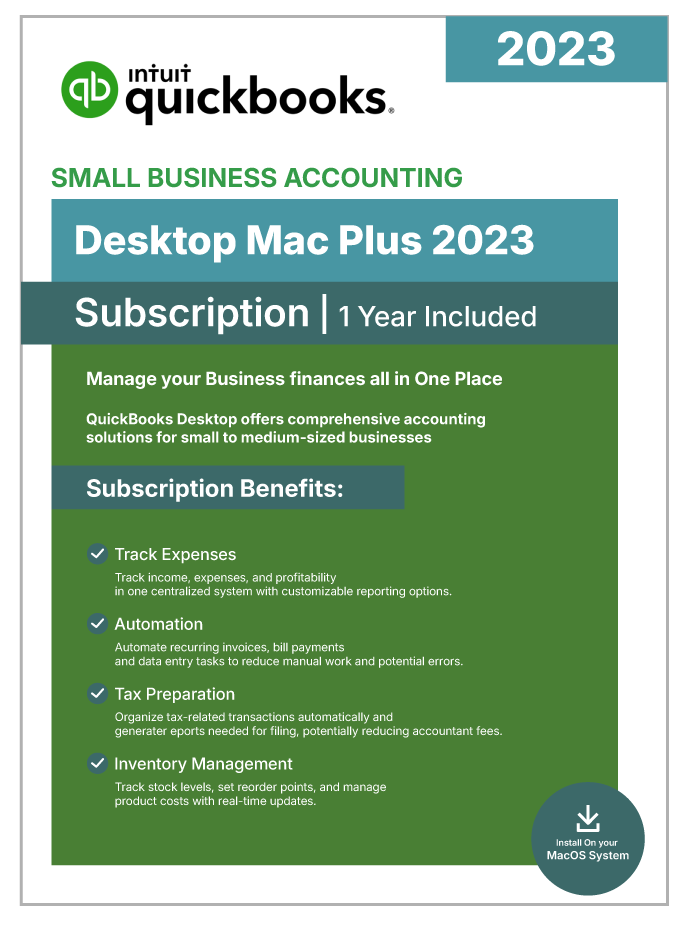
QuickBooks Desktop Mac Plus 2023 – 1 Year Subscription
$199.99
USD - subscription payment
Genuine License Key: Ships with a verified, one-of-a-kind 1-year subscription key, ready for instant activation.
Official Software Access: Delivers full entitlement to the genuine QuickBooks Desktop build, including every official patch and security update.
Data Security: Keeps your books on your own machine with scheduled automatic backups, so financial data stays under your control.
Digital Delivery: Fully digital fulfillment — the download link and license credentials arrive by secure email shortly after purchase.
Emailed after verificationUsually within a few business hours
Free installation supportUntil the software activates
Product overview
Product Overview
QuickBooks Desktop Mac Plus 2023 is Intuit’s native macOS accounting platform, giving Apple users a purpose-built financial management application that plugs deeply into the Mac ecosystem. As a prior-year subscription, it offers the same core accounting capabilities as the newer 2024 release — Apple Silicon optimization, cloud backup, mobile receipt capture, and native macOS integration — at a lower cost.
The 2023 edition runs natively on Apple Silicon M1 and M2 processors — no Rosetta 2 emulation required — delivering fast report generation and responsive multitasking. Intel Core i5 and higher processors are also supported. The software runs on macOS Monterey, Big Sur, and Catalina, and integrates with iCloud for file sharing, Mac Mail for invoice delivery, Apple Contacts for customer records, AirPrint for direct printing, and Time Machine for local backups.
At its core, Mac Plus 2023 delivers a complete double-entry accounting suite — professional invoicing, automatic expense categorization, bank reconciliation, sales tax management, inventory tracking with reorder alerts, and job costing for project profitability. More than 100 customizable reports export to Apple Numbers or share through iCloud. The subscription bundles in automated cloud backup to Intuit’s servers, mobile receipt capture via the QuickBooks iOS app, and continuous security updates.
Mac-first small businesses, freelancers, and creative professionals who want professional desktop accounting without switching to Windows — and who prefer the lower cost of a prior-year subscription — will find that Mac Plus 2023 delivers the trusted QuickBooks experience in a native Apple package.
Included capabilities
Product Features
- One-Year Subscription with Continuous Updates — Ongoing access to feature releases, security patches, and the latest macOS compatibility throughout the subscription term.
- Native Apple Silicon Support — Runs natively on M1 and M2 Apple Silicon processors — no Rosetta 2 emulation — for faster report generation and smoother multitasking.
- Complete Double-Entry Accounting — Handles General Ledger, A/P, A/R, sales tax, budgets, and bank reconciliations inside one integrated Mac application.
- Automated Cloud Backup — Company file automatically backs up to Intuit’s secure servers on a schedule — protection against local hardware loss without any manual work.
- Mobile Receipt Capture — Snap receipts through the QuickBooks iOS app and expenses sync back to your Mac file — end-of-quarter shoebox no longer necessary.
- Deep macOS Ecosystem Integration — Native hooks into iCloud, Mac Mail, Apple Contacts, AirPrint, and Time Machine for a Mac-first accounting workflow.
- Retina Display Optimization — Sharp text and vivid charts on Retina Display Macs — no fuzzy Windows-app-style rendering.
- Inventory Management — Watch stock levels, set reorder points, and compute Cost of Goods Sold — suitable for product-based businesses.
- Job Costing for Project Profitability — Assign labor, materials, and overhead to specific projects to identify which engagements are actually profitable.
- Three Simultaneous Users — Share the company file with up to three team members across a local network, with role-based permissions.
Technical details
Minimum Requirements / Specifications
| Requirement | Minimum | Recommended |
| Operating System | macOS Catalina (10.15) | macOS Monterey (12.0) |
| Processor | Apple Silicon (M1) or Intel Core i5 | Apple Silicon M1 or M2 |
| RAM | 4 GB | 8 GB |
| Disk Space | 2.5 GB available | SSD with 10 GB+ available |
| Internet | Required for activation, updates, cloud backups, and connected services | Broadband (1 Mbps+) |
| Display | 1280 x 800 resolution | Retina Display |
| Apple Ecosystem | iCloud, Mac Mail, Apple Contacts, AirPrint, Time Machine | — |
| License Type | 1-Year Subscription (annual renewal required) | — |
| Max Simultaneous Users | 3 | — |
| Platform | macOS only (not available for Windows) | — |
Common questions
Frequently Asked Questions
Q: What is QuickBooks Desktop Mac Plus 2023?
A: Mac Plus 2023 is Intuit’s native macOS accounting application, sold as a one-year subscription. It provides double-entry bookkeeping, professional invoicing, expense tracking, bank reconciliation, inventory management, and job costing — all with Apple Silicon M1/M2 optimization. The subscription includes automated cloud backups, mobile receipt capture through the QuickBooks iOS app, continuous security updates, and feature releases throughout the term.
Q: Is Mac Plus 2023 a subscription or a one-time purchase?
A: Mac Plus 2023 is a one-year subscription. It renews annually to maintain connected services (cloud backup, mobile receipt capture, security updates). This is different from the older Mac 2020 and Mac 2019 releases, which were perpetually licensed one-time purchases.
Q: How is Mac Plus 2023 different from Mac Plus 2024?
A: Both share the same core accounting capabilities. Mac Plus 2024 adds optimization for Apple Silicon M3 processors, supports macOS Sonoma natively, and receives the newest feature releases. Mac Plus 2023 is the prior-year release, offered at a lower subscription price, and supports M1 and M2 Apple Silicon plus macOS Monterey, Big Sur, and Catalina.
Q: Does Mac Plus 2023 run natively on Apple Silicon?
A: Yes. Mac Plus 2023 is code-signed for native execution on Apple Silicon M1 and M2 processors — no Rosetta 2 emulation is required. This delivers noticeably faster report generation, faster search across large company files, and better battery life on MacBooks than running under Rosetta 2.
Q: What happens when my subscription expires?
A: When the one-year subscription lapses, connected services (cloud backup, mobile receipt capture, security updates, technical support, and new feature releases) stop working. The core accounting software will typically continue to open your company file for a limited time in read-only mode, but full functionality requires either renewal or migration to a newer subscription. Backing up your company file before renewal decisions is strongly recommended.
Q: How many users can Mac Plus 2023 support?
A: Mac Plus 2023 supports up to three concurrent users on a local network, with each user beyond the first requiring an additional license seat. The Mac product line has no Premier or Enterprise upgrade path, so businesses that need more concurrent access typically move to the Windows product line.
Q: What are the system requirements for Mac Plus 2023?
A: Mac Plus 2023 needs macOS Monterey (12.0), Big Sur (11.0), or Catalina (10.15), 4 GB of RAM minimum (8 GB recommended), and 250 MB of free disk space. Apple Silicon M1 or M2 processors run natively; Intel Core i5 or higher is supported. An internet connection is required for activation and connected services.
Q: Can I import my QuickBooks Windows data into Mac Plus 2023?
A: Yes. Mac Plus 2023 supports importing company files that have been converted from QuickBooks Windows using Intuit’s conversion utility. Not every data element transfers cleanly — custom templates, some report formats, and advanced features may need to be rebuilt in the Mac edition. Reviewing the imported file for accuracy is recommended before you rely on it for daily operations.
Customer feedback
Reviews
You may also like
View category Related Products
Reviews
There are no reviews yet.